GST Amendment (Core & Non-Core)
Section 28 of the CGST Act requires taxpayers to report material changes in registration particulars within 15 days using FORM GST REG-14 to keep GSTIN records compliant.

Key Statutory Details & Highlights
- Statutory Form: FORM GST REG-14 (and REG-15 Approval Order for Core Fields) | Typical Timeline: Instant auto-approval for Non-Core fields | 7–15 working days for Core fields
- Government Fee Note: Government portal fee is ₹0 for both Core and Non-Core amendments.
- Core Field Amendments (Officer approval required): Change in legal/trade name (without PAN change), principal place of business address within the same state, additional place of business, or addition/retirement of partners/directors.
- Non-Core Field Amendments (Auto-approved): Bank account details, mobile number/email of authorized signatory, HSN/SAC codes, or business activity details.
- Note: Change in PAN or moving principal place of business to a different state cannot be amended—it requires a new GST registration.
- For Address Change: New electricity bill/property tax receipt + valid Rent Agreement or notarized NOC.
- For Partner/Director Change: Amended Partnership Deed, LLP Form 4, or MCA DIR-12 / Board Resolution with KYC.
- For Trade Name / Legal Name: Updated Certificate of Incorporation or trade name resolution.
Visual Compliance Workflow & Documentation Reference


Detailed Statutory Guide
- • Legal Framework of GST Registration Amendments Under Section 28 & Rule 19
- • Core Field Amendments in FORM GST REG-14: Legal Name, Premises, APOB & Promoters
- • Non-Core Field Amendments, Rule 10A Bank Account Mandate & Geocoding Verification
- • Non-Amendable Changes: PAN Migration, Inter-State Relocation & Entity Conversion
- • Handling FORM GST REG-03 Amendment Queries, Rule 25 Verification & REG-04 Replies
- • Step-by-Step Portal Walkthrough for FORM GST REG-14, Verification & Rule 19(5) Deemed Approval
Section 28 of the CGST Act requires taxpayers to report material changes in registration particulars within 15 days using FORM GST REG-14 to keep GSTIN records compliant.
Determine whether the update needs officer verification (Core) or qualifies for instant portal update (Non-Core).
Prepare verified address proofs, resolutions, and geocoded coordinates for premises updates.
File FORM GST REG-14 with date of amendment and reason, signed via EVC or DSC.
Track officer verification, respond to any REG-03 query, and download the updated GST certificate.
Business operations evolve continuously after initial GSTIN allotment: offices relocate to larger commercial premises, D2C brands add fulfillment warehouses across industrial parks, partnership firms induct or retire partners, private limited companies appoint new authorized signatories, corporate legal names change before the Registrar of Companies, and primary bank accounts migrate between banks. Under Section 28 of the Central Goods and Services Tax Act, 2017 read with Rule 19 of the CGST Rules, every registered taxpayer must formally report changes in statutory registration particulars via FORM GST REG-14 within fifteen calendar days of the change occurring.
Indian GST law sharply bifurcates amendment requests into two distinct compliance workflows: Core Field Amendments (requiring formal scrutiny and affirmative order in FORM GST REG-15 by the jurisdictional Proper Officer within fifteen working days) and Non-Core Field Amendments (processed instantaneously through automated portal approval upon OTP/DSC verification with zero officer intervention). Equally critical are the three non-amendable statutory boundaries—changes in Permanent Account Number (PAN), relocation across state or Union Territory borders, and change in business constitution altering the PAN—which cannot be executed through REG-14 and require a fresh FORM GST REG-01 registration paired with FORM GST ITC-02 credit transfer where applicable.
Operating from an unamended office address, storing inventory at an unregistered warehouse, or missing the thirty-day Rule 10A bank account update window exposes businesses to immediate Rule 21A registration suspension, in-transit Section 129 E-Way Bill detention penalties, and physical verification cancellation under Rule 25. This comprehensive statutory guide walks Indian founders, chartered compliance teams, and SME operators through every Core and Non-Core field rule, exact documentary matrices for owned/rented/co-working/FBA warehouse addresses, geocoding verification, REG-03 objection defence strategies, and three worked Indian Rupee compliance case studies.
Section 28(1) of the CGST Act imposes an affirmative statutory duty on every registered person—and every holder of a Unique Identity Number (UIN)—to inform the Proper Officer of any alterations in the information furnished at the time of registration or subsequently, within fifteen days of such change, in the manner prescribed under Rule 19. Keeping the registration master synchronized with real-world operational facts is not merely an administrative formality: tax invoices, E-Way Bill dispatch origins, jurisdictional officer assignments, bank refund routing, and physical inspection records all pull live data directly from the GSTIN registration master.
Importantly, Section 28(2) read with Rule 19(4) embeds a strong procedural safeguard for taxpayers: the Proper Officer cannot arbitrarily reject a Core Field amendment application without first serving a Show Cause Notice in FORM GST REG-03 within fifteen working days and affording the applicant a reasonable seven-working-day opportunity to furnish explanations or supplementary proofs in FORM GST REG-04. Moreover, if the officer fails to act within the prescribed fifteen-working-day statutory window (or within seven working days of receiving a REG-04 reply), Rule 19(5) triggers deemed approval—meaning the amendment certificate stands automatically approved and updated on the GST Common Portal.
Core Fields (Officer Verification Required) Legal Name of Business (without PAN change); Principal Place of Business (PPOB) within same state; Addition/Deletion of Additional Place of Business (APOB) in same state; Addition/Retirement of Partners, Directors, Karta, Managing Committee, Trustees, or CEO responsible for day-to-day affairs. FORM GST REG-14 → Officer scrutiny → FORM GST REG-15 order within 15 working days (or REG-03 query → REG-04 reply within 7 working days). Deemed approval under Rule 19(5) if officer takes no action. Mandatory documentary proof matching exact change (e.g., Fresh COI for name change, Lease/Electricity Bill for PPOB/APOB, Amended Partnership Deed / DIR-12 / Board Resolution for promoter change).
Non-Core Fields (Instant Auto-Approval) Bank Account additions/edits (Rule 10A); Trade Name (when legal name unchanged); Authorized Signatory updates; HSN/SAC goods & services list; Mobile number & email ID of Primary Authorized Signatory; Geocoding coordinates of existing premises; Business activity details; Minor typographical edits. FORM GST REG-14 (Non-Core) → Instant system validation (OTP/DSC) → Immediate auto-approval and ARN confirmation within minutes; zero officer scrutiny. Cancelled cheque/bank statement for bank updates (verified via NPCI penny-drop); Board Resolution / Authorization Letter for changing Primary Authorized Signatory.
Non-Amendable Fields (Fresh REG-01 Mandatory) Change in PAN (e.g., Proprietorship to Partnership/LLP/Pvt Ltd); Inter-state shift of Principal Place of Business (e.g., shifting from Delhi Code 07 to Haryana Code 06); Change of State Code within GSTIN. Cannot use FORM GST REG-14. Must apply for fresh GSTIN in FORM GST REG-01, transfer credit via ITC-02 (where going-concern transfer applies), and cancel legacy GSTIN via REG-16. Full fresh REG-01 KYC, new PAN, new state premises documentation, and Business Transfer Agreement + CA certificate for ITC-02.
Because Core Fields directly govern tax jurisdiction, legal accountability, and physical verification eligibility, GST officers inspect Core Field REG-14 submissions almost as rigorously as original new registration applications. Uploading blurred scans, unnotarized single-page rent letters without landlord utility proof, or mismatched effective dates routinely invites FORM GST REG-03 clarification notices and can delay warehouse activation or corporate rebranding by two to four weeks.
Prepare the exact statutory document bundle before initiating the portal workflow under Services > Registration > Amendment of Registration Core Fields.
When a Private Limited company changes its registered corporate name before the Ministry of Corporate Affairs (MCA) and obtains a fresh Certificate of Incorporation Pursuant to Change of Name (Form INC-25), its corporate PAN remains identical—allowing a clean Core Field amendment in REG-14. Similarly, if an individual sole proprietor legally changes their name via Gazette Notification and updates their PAN database first, the GST legal name can be amended once the Income Tax PAN database reflects the revised legal name.
Critical Portal Synchronization Rule: Always update the name with NSDL/UTIITSL Income Tax PAN records FIRST before filing REG-14. The GST portal performs a live real-time CBDT PAN validation check; if the entered new legal name does not match the live PAN master character-for-character, the portal blocks submission. Note also that once a Legal Name amendment is approved in one state GSTIN, Rule 19(1) automatically propagates the updated legal name across ALL other state GSTINs registered under the exact same PAN.
Attach MCA Fresh Certificate of Incorporation (Form INC-25) for companies or LLP Form 16 Certificate of Registration on Change of Name for LLPs.
For partnerships amending firm name without changing PAN, upload the Amended/Supplementary Partnership Deed and updated PAN card reflecting the new firm name.
Specify the exact date of the MCA/Gazette certificate as the "Date of Amendment" and clearly explain in the "Reasons" box that legal entity constitution and PAN remain unchanged.
Moving an office, factory, or retail showroom from one locality to another within the same state (for example, relocating from Andheri to Lower Parel in Maharashtra, or from Madhapur to Jubilee Hills in Telangana) requires a Core Field PPOB amendment within fifteen days. Because relocating across districts or circles inside a large metropolitan city frequently alters your jurisdictional Ward, Division, or Range, you must verify and update the State Jurisdiction / Center Jurisdiction fields carefully where applicable.
Always cross-verify the Pin Code, Building/Flat Number, Floor Number, Road/Street, and Geocode pin location against the attached electricity bill or municipal property tax receipt. Even minor discrepancies—such as listing "4th Floor" in the REG-14 form while the attached Lease Agreement specifies "3rd Floor"—trigger immediate REG-03 rejection queries or Rule 25 physical inspection visits.
Owned Premises: Latest Electricity Bill, Municipal Khata Copy, or Property Tax Receipt in the exact name of the proprietor, firm, LLP, or company.
Rented / Leased Premises: Valid Rent or Lease Agreement (e-registered Leave & License preferred in Maharashtra) PLUS the landlord’s latest Electricity Bill or Property Tax Receipt proving ownership continuity.
Shared / Consent / Family-Owned Premises: Signed Consent Letter (NOC) on ₹100 stamp paper from the property owner authorizing business usage PLUS the owner’s latest Electricity Bill or Property Tax Receipt.
Sub-Leased or Co-Working Space: Complete three-link ownership chain—(a) Main Landlord Utility Bill/Property Tax Receipt, (b) Head Lease between Landlord and Co-Working Operator permitting sub-licensing, and (c) Dedicated Desk/Cabin Membership Agreement + NOC issued to your entity.
Under Section 2(85) and Section 35(1) of the CGST Act, every location within the state where a taxpayer stores taxable goods, maintains books of accounts, operates a retail branch, runs a job-work depot, or dispatches online marketplace orders MUST be declared as an Additional Place of Business (APOB) on the GST registration certificate. Storing stock in an undeclared godown violates Section 35 and exposes the entire inventory to detention and seizure under Section 67/129 during enforcement inspections.
For Indian e-commerce sellers onboarding onto Amazon FBA (Fulfillment by Amazon), Flipkart Assured (FBF), Myntra, Blinkit, Zepto, or Swiggy Instamart dark stores, adding the marketplace’s fulfillment warehouse as an APOB is mandatory before shipping inventory into those centers. Marketplace operators supply an official APOB documentation pack comprising the warehouse landlord’s ownership proof, head lease, and a No Objection Certificate (NOC) / Seller Fulfillment Agreement—which must be merged cleanly into a readable PDF under the portal’s file-size ceiling and uploaded under the "Additional Places of Business" tab in Core Field REG-14.
Whenever a Partnership Firm reconstitutes by admitting a new partner or retiring an outgoing partner (without dissolving the firm or changing its PAN), or when a Private Limited Company appoints or removes a Director or Managing Director on the MCA portal, the Promoter/Partner master must be updated via Core Field REG-14 within fifteen days. Crucially, Rule 19(1A) explicitly warns that if a retiring partner or resigning director is NOT removed from the GST registration master, they may continue facing statutory recovery notices under Section 90 (joint and several liability of partners) until proper intimation is served on the Commissioner.
Retiring Partner Safeguard (Section 90 Proviso): Where a partnership firm fails to file REG-14 removing a retired partner, Section 90 allows the retiring partner themselves to give formal written intimation of retirement to the Commissioner within one month—limiting their joint liability strictly to the date of retirement.
Mandatory Documents for Partnership Reconstitution: Executed Reconstitution / Admission-cum-Retirement Deed signed by continuing and outgoing partners, PAN/Aadhaar/photograph of newly inducted partners, and updated authorization if the primary signatory changed.
Mandatory Documents for Company Director Changes: MCA Form DIR-12 with challan receipt, Board Resolution recording appointment/resignation, and KYC (PAN, DIN, Aadhaar, photo) of newly appointed directors.
Primary Authorized Signatory Rule: Never attempt to delete an outgoing partner or director who is currently designated as the "Primary Authorized Signatory." First add and designate a new Primary Authorized Signatory via Non-Core Amendment, wait for auto-approval, and ONLY THEN delete the outgoing individual via Core Field Amendment.
The GST portal blocks deletion of any Promoter/Partner/Director who is simultaneously marked as the Primary Authorized Signatory. Always execute Step 1 (Non-Core REG-14: add the incoming Authorized Signatory and promote them to Primary Authorized Signatory—instant approval) BEFORE executing Step 2 (Core REG-14: remove the outgoing partner or director).
Non-Core Field amendments cover operational and contact metadata that do not alter legal identity or state tax jurisdiction. Accessible under Services > Registration > Amendment of Registration Non-Core Fields, these edits bypass officer queues completely and reflect on the taxpayer profile within fifteen minutes of EVC/DSC submission—making them indispensable for maintaining uninterrupted portal access, accurate e-invoicing master sync, and smooth bank refund processing.
Following the amendment of CGST Rule 10A via Notification No. 38/2023-Central Tax, every newly registered regular taxpayer (excluding TDS/TCS/suo-motu registrants) MUST furnish valid bank account details within strictly THIRTY DAYS from the date of grant of registration, OR before furnishing outward supply details in FORM GSTR-1 / Invoice Furnishing Facility (IFF), whichever is EARLIER. Crucially, the bank account MUST be held in the exact legal name of the registered business and linked to the identical Permanent Account Number (PAN) on which the GSTIN was granted—and for sole proprietorships, the bank account must also be seeded with the proprietor’s Aadhaar.
Once bank account number, IFSC code, and supporting documentary proof (first page of passbook, recent bank statement, or cancelled cheque displaying account holder name, account number, and IFSC) are submitted via Non-Core REG-14, the GSTN system triggers an automated NPCI penny-drop / bank validation check. Failing to complete Rule 10A within the 30-day window triggers automatic portal suspension of the GSTIN under Rule 21A(2A) and locks GSTR-1 filing immediately until compliant bank details are uploaded and validated.
Rebranding a consumer-facing store or D2C label without altering the underlying legal entity name is executed instantaneously by modifying the "Trade Name" field inside Non-Core REG-14 (and businesses can even add up to nine additional trade names on the portal where operating multiple consumer brands under one legal entity). Similarly, expanding into new product lines or service verticals—such as a trading firm adding software consulting or warehouse leasing—requires updating the Top 5 HSN/SAC codes and nature of business activities via Non-Core Amendment so GSTR-1 outward reporting matches declared business scope.
Updating the Primary Authorized Signatory’s mobile number or email ID requires dual OTP verification (an OTP sent to the NEW mobile/email and final EVC/DSC submission). If the previous tax consultant or departed employee registered their personal email/phone and is uncooperative, an existing director or proprietor with a valid Class-3 DSC can still log in (or obtain officer reset via jurisdictional helpdesk) and immediately migrate the Primary Authorized Signatory contact credentials via Non-Core REG-14.
The GSTN portal now provides a dedicated Geocoding validation utility right on the taxpayer dashboard allowing businesses to confirm or adjust the exact latitude and longitude map pin for both Principal Place of Business (PPOB) and Additional Places of Business (APOB). Confirming accurate geocoding is a one-time Non-Core step that prevents field verification officers from marking genuine commercial offices as "untraceable" during surprise Rule 25 inspections or high-value refund verifications.
Bank Account Details (Rule 10A) Amendment of Non-Core Fields > Bank Accounts NPCI PAN-match & IFSC validation + PDF proof (< 100 KB / 1 MB per portal cap) Uploading personal savings account of a director instead of a PAN-matched corporate current account triggers validation failure and Rule 21A suspension.
Primary Authorized Signatory Email / Mobile Amendment of Non-Core Fields > Authorized Signatory Fresh OTP sent to new email & mobile + DSC/EVC filing Leaving a former consultant’s email ID active causes missed ASMT-10/REG-17 notices deemed validly served under Section 169.
Trade Name / Brand Name Amendment of Non-Core Fields > Business Details Instant auto-approval (reflected on updated REG-06 download) Confusing Legal Name (Core Field) with Trade Name (Non-Core Field); Legal Name changes require MCA/PAN proof first.
HSN / SAC Codes (Goods & Services) Amendment of Non-Core Fields > Goods & Services Up to 5 primary HSN & 5 SAC codes; instant update Trading in high-scrutiny items (iron scrap, tobacco, plywood) without updating declared business goods triggers risk-profiling flags.
Geocoding of Premises Dashboard > Geocode Principal / Additional Place of Business One-time GPS coordinate lock via map pin Accepting an auto-geocoded pin located 2 km away from actual storefront—always drag pin accurately onto exact building.
Attempting to force a structural restructuring through FORM GST REG-14 when the underlying Permanent Account Number or State Code has changed is technically impossible on the GST Common Portal—because the 15-digit GSTIN embeds both the 2-digit State Code (digits 1–2) and the 10-character PAN (digits 3–12). Understanding the exact legal sequence for non-amendable transitions protects businesses from broken Input Tax Credit chains, double taxation on transferred stock, and overlapping compliance penalties.
Suppose a SaaS startup or wholesale distributor shifts its sole office from Delhi (State Code 07) across the border to Gurugram, Haryana (State Code 06) or Noida, Uttar Pradesh (State Code 09). Even though the distance may be only fifteen kilometers and the PAN stays identical, GST treats every state registration as a separate "distinct person" under Section 25(4). You cannot amend a 07-prefixed GSTIN into a 06-prefixed GSTIN.
Correct Statutory Execution: First apply for a fresh GSTIN in the destination state (Haryana Code 06) using FORM GST REG-01 with Haryana premises proof. Next, transfer physical inventory and usable equipment from the Delhi GSTIN to the Haryana GSTIN by issuing an inter-state IGST tax invoice (and E-Way Bill above ₹50,000)—using Delhi’s existing Electronic Credit Ledger to discharge the IGST output tax while the Haryana GSTIN simultaneously claims 100% of that IGST as eligible Input Tax Credit in its GSTR-2B! Note that FORM GST ITC-02 CANNOT be used to transfer unutilized credit across two different states; inter-state stock invoicing is the lawful, cash-neutral credit migration method. Once stock and billing shift completely to Haryana, file voluntary cancellation (REG-16) and Final Return (GSTR-10) for the legacy Delhi GSTIN.
Converting a proprietorship into an LLP or Private Limited company—or converting a partnership firm into a company under Part I of Chapter XXI of the Companies Act, 2013—creates a brand-new PAN. Because the transfer occurs within the SAME state as a going concern (assets and liabilities transferred together), Entry 2 of Notification No. 12/2017-CT(Rate) exempts the slump transfer of business from GST, and Section 18(3) read with Rule 41 allows transferring 100% of the legacy entity’s unutilized CGST, SGST, and IGST Electronic Credit Ledger balance directly to the new entity’s GSTIN via FORM GST ITC-02.
Crucially, ITC-02 requires uploading a certificate from a practicing Chartered Accountant or Cost Accountant confirming that the sale/merger/conversion includes transfer of specific liabilities alongside assets. The transferee company must log in and formally click "Accept" on the ITC-02 filing inside its portal before the old entity applies for REG-16 cancellation.
When a jurisdictional officer scrutinizes a Core Field REG-14 application—especially for Principal Place of Business relocation, adding an industrial warehouse APOB, or onboarding new partners—and spots missing ownership links, blurred PDFs, or local risk flags, they issue a Notice Seeking Clarification in FORM GST REG-03 within fifteen working days. You receive strictly SEVEN WORKING DAYS from receipt of REG-03 to upload a structured point-by-point response in FORM GST REG-04.
Failing to file REG-04 within seven working days causes automatic rejection of the amendment application in FORM GST REG-05. While a rejected REG-14 does not cancel your existing active GSTIN, repeated rejections leave your actual business premises unamended—creating severe exposure if enforcement officers inspect the new address before registration records are updated.
Most REG-03 amendment queries stem from preventable documentation mismatches rather than substantive legal objections. Reviewing every upload against these six verification points sharply raises first-pass REG-15 approval rates:
Incomplete Ownership Chain on Sub-Leased / Co-Working Premises: Always merge the building owner’s electricity bill/property tax receipt, main lease authorizing sub-letting, and your operator agreement/NOC into one single sequential PDF with highlighted matching address lines.
Stale or Unreadable Utility Bills: Never upload an electricity bill older than two months or a cropped screenshot hiding the consumer name and billing address. Download the official PDF bill directly from the DISCOM portal (BESCOM, MSEDCL, BSES, TANGEDCO, TGSPDCL, Torrent Power, CESC).
Mismatch Between Stamp Paper Date & Lease Commencement Date: Ensure rent deeds or NOCs carry valid state-compliant stamp duty, full signatures of both lessor and lessee, two witness signatures, and matching date consistency.
Missing Storefront / Premises Signboard Verification: For PPOB shifts in high-scrutiny jurisdictions (Delhi NCR, Gujarat, Maharashtra, Telangana), proactively attach a clean geo-tagged photograph showing your legal name and 15-digit GSTIN prominently displayed outside the new premises in compliance with Rule 18.
Pending Non-Compliance on Existing GSTIN: Clear any overdue GSTR-1/3B returns or pending DRC-01B/01C intimations before filing Core Field REG-14, as officers review overall compliance history alongside amendment applications.
Unclear Explanation of Amendment Reason: Use the REG-04 text box to directly answer each numbered query raised in REG-03 with exact document page references rather than pasting generic one-line replies.
Immediately after receiving FORM GST REG-15 (for Core Field approvals) or ARN confirmation (for Non-Core auto-approvals), download your freshly updated Registration Certificate (FORM GST REG-06) under Services > User Services > View/Download Certificates and display it prominently at both Principal and Additional Places of Business as required by Rule 18.
Remember that updating the main GST Common Portal does NOT always update third-party compliance portals instantaneously. Log in to the E-Way Bill Portal (ewaybillgst.gov.in) and the Invoice Registration Portal (einvoice1.gst.gov.in) and click "Update from GST Common Portal" under "My Masters / Update My GSTIN" so your revised legal name, trade name, or newly added warehouse dispatch addresses immediately synchronize for error-free E-Way Bill and IRN generation.
E-Way Bill Portal (ewaybillgst.gov.in) Click "Update My GSTIN" to sync updated PPOB, APOB dispatch addresses & Trade Name. Inability to select new warehouse dispatch address; Section 129 transit detention risk.
E-Invoice IRP Portal (einvoice1.gst.gov.in) Trigger GSTIN master refresh so QR code / IRN JSON carries updated legal name & address. IRN validation errors or B2B buyer invoice rejection during AP verification.
ERP / Accounting Software (Tally, Zoho, SAP) Update company header, invoice print templates, branch address master, and bank details. Issuing invoices with obsolete office address violates Rule 46 invoice particulars.
Physical Signboard & REG-06 Display (Rule 18) Display updated GSTIN/Legal Name signboard and printed REG-06 at new PPOB and every APOB. General penalty up to ₹25,000 under Section 125 during field inspections.
ICEGATE / IEC / Bank Current Account / Marketplace Seller Central Update DGFT IEC profile, AD Code bank records, and Amazon/Flipkart/Razorpay KYC records. Blocked IGST export refunds at Customs or frozen marketplace disbursements.
Filing FORM GST REG-14 smoothly on the GST Common Portal depends on clean pre-submission file preparation, selecting the right amendment track (Core vs. Non-Core), entering an accurate Date of Amendment that corresponds directly to supporting legal instruments, and avoiding common portal session errors during DSC or Aadhaar EVC signing. Note that you cannot file a fresh Core Field amendment while a previous Core Field ARN is still pending officer adjudication; however, you may continue filing periodic GSTR-1 and GSTR-3B returns without interruption while an amendment ARN is under review.
Below is the field-tested end-to-end portal execution workflow used by corporate compliance teams across India to achieve single-cycle FORM GST REG-15 approval without repeated portal rejections.
Before logging into the GST portal, assemble all supporting PDF documents (under 1 MB per attachment; bank proofs and photographs under 100 KB in JPEG/PDF as mandated by individual upload controls) using clear grayscale scans at 150–200 DPI so text, stamp paper serial numbers, signatures, and electricity consumer IDs remain crisply legible to the verifying officer.
Step 1 — Select the Appropriate Track: Log in to gst.gov.in and navigate to Services > Registration > Amendment of Registration Core Fields (for Legal Name, PPOB, APOB, or Partner/Director edits) OR Amendment of Registration Non-Core Fields (for Bank Account, Trade Name, Authorized Signatory, Contact Details, or HSN/SAC edits).
Step 2 — Edit Only Target Fields & Specify Exact Effective Date: Click the Edit icon strictly inside the tab requiring modification. Enter the exact Date of Amendment matching your Lease Deed execution date, MCA Certificate date, Partnership Reconstitution Deed date, or Board Resolution date—never backdate arbitrarily prior to your original GSTIN effective date.
Step 3 — Draft a Specific Statutory Reason: In the mandatory "Reasons" narrative box, state concise, factual details citing the attached proof (for example: "Relocation of Principal Place of Business within Bengaluru Urban district effective 01 Nov 2026 under registered commercial lease deed dated 28 Oct 2026; latest BESCOM bill and landlord ownership chain attached").
Step 4 — Upload Verified Supporting Documents & Check Geocoding: Attach the merged PDF proof for each edited tab and verify the map pin under Place of Business details so latitude/longitude coordinates align precisely with the building street address.
Step 5 — Complete Verification via DSC or EVC & Preserve ARN: Open the Verification tab, select the active Primary Authorized Signatory, enter place of filing, and submit using Class-3 DSC (mandatory for Companies and LLPs via emSigner utility) or Aadhaar/Mobile EVC OTP (for Proprietorships, Partnerships, and HUFs). Download the generated ARN acknowledgement PDF immediately.
Step 6 — Track ARN & Respond Promptly to REG-03: Monitor ARN status every 48 hours under Services > Track Application Status AND check Services > User Services > View Notices and Orders. If FORM GST REG-03 is issued, file FORM GST REG-04 within strictly seven working days.
Rule 19(5) of the CGST Rules establishes an explicit statutory anti-delay safeguard: if the Proper Officer neither issues the FORM GST REG-15 amendment approval order nor serves a FORM GST REG-03 clarification notice within fifteen working days from the date of submission of REG-14—or fails to pass final orders within seven working days of receiving the taxpayer’s REG-04 clarification reply—the registration certificate stands DEEMED AMENDED to the extent applied for, and the amended FORM GST REG-06 certificate becomes automatically available on the common portal.
In rare operational instances where an application remains stuck at "Pending for Processing" beyond fifteen working days due to jurisdictional officer transfer or technical queue lag, file a structured ticket on the GST Self-Service Grievance Portal (selfservice.gstsystem.in) quoting your 15-digit ARN, submission date, and Rule 19(5) elapsed working-day count, alongside a polite physical/email representation to the jurisdictional Deputy or Assistant Commissioner attaching the ARN acknowledgement and clean proof bundle. This dual escalation resolves stalled Core Field amendments rapidly while establishing a clear documentary trail protecting the taxpayer against allegations of non-intimation.
To enable same-day delivery across Mumbai and Pune, the brand needed to dispatch ₹45,00,000 of inventory into an Amazon FBA fulfillment center in Bhiwandi (Thane district) and a quick-commerce dark-store hub in Chakan (Pune district). Attempting to ship goods directly without APOB registration risked immediate ₹16,20,000 Section 129(1)(a) penalty (200% tax) if intercepted during transit or warehouse inspection.
Under Section 28 and Rule 19, the compliance team collected each marketplace’s complete APOB documentation kit (building owner property tax receipt + MSEDCL power bill + main lease agreement + marketplace NOC naming the brand’s exact legal name and GSTIN), verified Pin Codes and taluka/ward jurisdictions, and filed a single consolidated Core Field REG-14 application adding both Bhiwandi and Chakan facilities as Additional Places of Business.
Both APOB warehouses received FORM GST REG-15 approval in 9 working days with zero REG-03 queries. E-Way Bill and IRP portals were synced immediately via "Update My GSTIN," enabling compliant dispatch of ₹45,00,000 stock with zero detention exposure and seamless monthly TCS reconciliation in GSTR-2B/Cash Ledger.
Bundling clean, unbroken ownership-chain PDFs inside a single Core Field REG-14 application eliminates costly marketplace onboarding bottlenecks and protects high-velocity inventory.
Due to delays in opening the LLP’s corporate current account, the partners forgot to furnish bank details within 30 days under Rule 10A. On Day 33, the GST portal automatically suspended the GSTIN under Rule 21A(2A), issued FORM GST REG-31, and blocked GSTR-1 filing—halting ₹9,40,000 in milestone invoices to an enterprise client.
Instead of panicking or applying for a duplicate GSTIN, the LLP finalized its PAN-matched corporate current account within 48 hours, obtained a bank-stamped cancelled cheque bearing the exact LLP legal name and IFSC, and filed a Non-Core Field Amendment in FORM GST REG-14 uploading the bank proof. Within 24 hours of successful NPCI penny-drop verification, the proviso to Rule 21A(4) triggered automatic portal revocation of suspension with zero officer visit required.
Restored full active GSTIN status within 36 hours, avoided ₹1,69,200 in delayed GST billing disputes, and unlocked immediate GSTR-1 submission before the 11th due date.
Always treat the 30-day Rule 10A bank update deadline as mission-critical after REG-06 allotment; if suspended, Non-Core REG-14 bank submission resolves suspension automatically.
The operations team initially tried to file FORM GST REG-14 to change the Principal Place of Business from New Delhi to Gurugram, only to discover the State dropdown is permanently locked. Worse, the company held ₹7,20,000 in accumulated Electronic Credit Ledger balance in Delhi and feared losing the entire credit upon closing Delhi.
Recognizing that Delhi (07) and Haryana (06) are separate distinct persons under Section 25(4), the team obtained a fresh Haryana GSTIN (Code 06) via FORM GST REG-01 first. Once Haryana GSTIN became active, the Delhi entity raised an inter-state stock-transfer tax invoice (Schedule I, Entry 2) for ₹40,00,000 + 18% IGST (₹7,20,000) backed by valid E-Way Bills to its Haryana GSTIN. Delhi offset the entire ₹7,20,000 IGST output liability using its ₹7,20,000 Electronic Credit Ledger (₹0 cash paid), while Haryana simultaneously received ₹7,20,000 eligible IGST credit in GSTR-2B. Delhi was then cleanly closed via REG-16 and Nil GSTR-10.
Migrated 100% of ₹7,20,000 Input Tax Credit across state borders legally with zero cash outflow and zero credit lapse.
Never cancel a legacy state GSTIN before obtaining the destination state GSTIN and lawfully invoicing transferable inventory across distinct persons.
Frequently Asked Questions
- Can I change my GST registration from one state to another using amendment?
- No. Because the first two digits of a GSTIN represent the State Code, shifting a business to a new state requires applying for a fresh GST registration in the destination state and cancelling the old state registration if operations cease there.
- How quickly does a bank account or HSN code update reflect?
- Bank accounts, HSN/SAC codes, and authorized signatory contact details are Non-Core fields and typically auto-approve immediately after EVC/DSC submission.
Authoritative Government References
- • CGST Act, 2017 — Section 28 (Amendment of Registration) & Section 90 (Liability of Partners) (https://cbic-gst.gov.in/cgst-act.html)
- • CGST Rules, 2017 — Rule 10A (Bank Details), Rule 18 (Display), Rule 19 (Amendment) & Rule 41 (ITC-02) (https://cbic-gst.gov.in/cgst-rules.html)
- • CBIC Notification No. 38/2023-Central Tax (30-Day Rule 10A Bank Update & Auto-Revocation of Suspension) (https://taxinformation.cbic.gov.in/)
- • GST Common Portal — Core & Non-Core Amendment (FORM GST REG-14) & Geocoding User Manuals (https://www.gst.gov.in/)
- • E-Way Bill & E-Invoice Portal Master Synchronization Advisories (https://ewaybillgst.gov.in/)
GST Portal Reference, News & Updates & Popular Help Topics
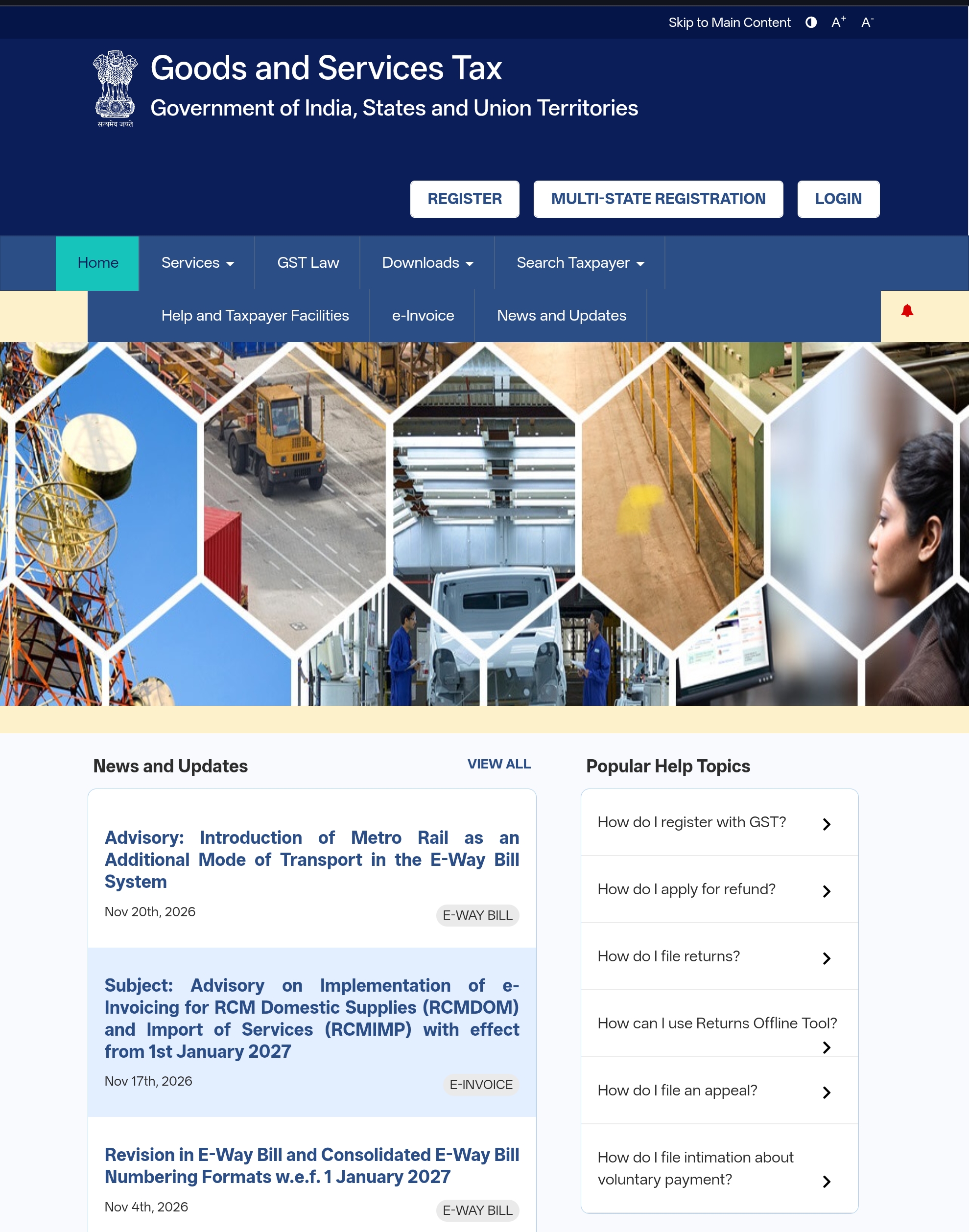
News and Updates
- Advisory: Introduction of Metro Rail as an Additional Mode of Transport in the E-Way Bill SystemNov 20, 2026 · E-Way Bill
- Subject: Advisory on Implementation of e-Invoicing for RCM Domestic Supplies (RCMDOM) and Import of Services (RCMIMP) with effect from 1st January 2027Nov 17, 2026 · e-Invoice
- Revision in E-Way Bill and Consolidated E-Way Bill Numbering Formats w.e.f. 1 January 2027Nov 4, 2026 · E-Way Bill