Filing Technical Tickets on GST Self-Service Grievance Redressal Portal
Practical Indian GST guide to Filing Technical Tickets on GST Self-Service Grievance Redressal Portal: understand raising structured ticket numbers with error screenshots, ARN/CPIN details, and timestamps on selfservice.gstsystem.in to preserve statutory limitation proof during portal glitches, applicable Official URL: selfservice.gstsystem.in | Helpline: 1800-103-4786, worked examples, and key compliance safeguards.

Key Statutory Details & Highlights
- Statutory Foundation: Filing Technical Tickets on GST Self-Service Grievance Redressal Portal: Under selfservice.gstsystem.in Official GSTN Technical Support Mechanism, Indian taxpayers evaluating Filing Technical Tickets on GST Self-Service Grievance Redressal Portal must anchor every billing and return decision on raising structured ticket numbers with error screenshots, ARN/CPIN details, and timestamps on selfservice.gstsystem.in to preserve statutory limitation proof during portal glitches. Getting the statutory classification right before raising invoices prevents downstream reconciliation gaps between books of account, GSTR-1, and GSTR-3B.
- Applicable Rates, Thresholds & Key Numbers: Consider a practical Indian business illustration of Filing Technical Tickets on GST Self-Service Grievance Redressal Portal: If a PMT-06 challan debits your bank on the 20th without generating a CIN or an ARN stays stuck post-biometrics, immediately log a ticket on selfservice.gstsystem.in attaching the full-screen browser screenshot with visible date/time and archive the Ticket Number. Documenting this exact tax computation on both the underlying tax invoice and the monthly working sheet provides immediate clarity during Section 61 return scrutiny.
- Return Reporting, ITC & Documentation Checklist: Every transaction involving Filing Technical Tickets on GST Self-Service Grievance Redressal Portal must flow accurately from the source tax invoice or voucher into GSTR-1 (Table 4/5/6/7/8/12) and GSTR-3B (Tables 3.1 and 4) under selfservice.gstsystem.in Official GSTN Technical Support Mechanism. Keeping electronic invoice copies, bank payment proofs, and contract copies organized for 72 months under Section 36 ensures effortless departmental audit closure.
- Common Mistakes & Scrutiny Risk Mitigation: The single most frequent compliance error observed on Filing Technical Tickets on GST Self-Service Grievance Redressal Portal is cropping error screenshots so the GSTIN, URL bar, and system clock are hidden (causing GSTN support to close tickets without resolution). Because GSTN analytics continuously compare GSTR-1, GSTR-2B, GSTR-3B, E-Way Bills, and Income Tax AIS/26AS data, unaddressed errors routinely trigger ASMT-10 scrutiny or Section 73/74A demands.
Visual Compliance Workflow & Documentation Reference


Detailed Statutory Guide
- • Statutory Foundation: Filing Technical Tickets on GST Self-Service Grievance Redressal Portal
- • Applicable Rates, Thresholds & Key Numbers
- • Return Reporting, ITC & Documentation Checklist
- • Common Mistakes & Scrutiny Risk Mitigation
Practical Indian GST guide to Filing Technical Tickets on GST Self-Service Grievance Redressal Portal: understand raising structured ticket numbers with error screenshots, ARN/CPIN details, and timestamps on selfservice.gstsystem.in to preserve statutory limitation proof during portal glitches, applicable Official URL: selfservice.gstsystem.in | Helpline: 1800-103-4786, worked examples, and key compliance safeguards.
Under selfservice.gstsystem.in Official GSTN Technical Support Mechanism, Indian taxpayers evaluating Filing Technical Tickets on GST Self-Service Grievance Redressal Portal must anchor every billing and return decision on raising structured ticket numbers with error screenshots, ARN/CPIN details, and timestamps on selfservice.gstsystem.in to preserve statutory limitation proof during portal glitches. Getting the statutory classification right before raising invoices prevents downstream reconciliation gaps between books of account, GSTR-1, and GSTR-3B.
In practical terms, the primary benchmark to track for Filing Technical Tickets on GST Self-Service Grievance Redressal Portal is Official URL: selfservice.gstsystem.in | Helpline: 1800-103-4786. Businesses should confirm PAN-level aggregate turnover across all state GSTINs before relying on any threshold relaxation or composition carve-out.
Consider a practical Indian business illustration of Filing Technical Tickets on GST Self-Service Grievance Redressal Portal: If a PMT-06 challan debits your bank on the 20th without generating a CIN or an ARN stays stuck post-biometrics, immediately log a ticket on selfservice.gstsystem.in attaching the full-screen browser screenshot with visible date/time and archive the Ticket Number. Documenting this exact tax computation on both the underlying tax invoice and the monthly working sheet provides immediate clarity during Section 61 return scrutiny.
Every transaction involving Filing Technical Tickets on GST Self-Service Grievance Redressal Portal must flow accurately from the source tax invoice or voucher into GSTR-1 (Table 4/5/6/7/8/12) and GSTR-3B (Tables 3.1 and 4) under selfservice.gstsystem.in Official GSTN Technical Support Mechanism. Keeping electronic invoice copies, bank payment proofs, and contract copies organized for 72 months under Section 36 ensures effortless departmental audit closure.
The single most frequent compliance error observed on Filing Technical Tickets on GST Self-Service Grievance Redressal Portal is cropping error screenshots so the GSTIN, URL bar, and system clock are hidden (causing GSTN support to close tickets without resolution). Because GSTN analytics continuously compare GSTR-1, GSTR-2B, GSTR-3B, E-Way Bills, and Income Tax AIS/26AS data, unaddressed errors routinely trigger ASMT-10 scrutiny or Section 73/74A demands.
Frequently Asked Questions
- Does a GSTN Grievance Ticket protect me if a portal bug causes late filing?
- Yes—preserving timestamped screenshots and an official GSTN Grievance Ticket ID serves as critical documentary evidence when seeking late-fee waiver or High Court/appellate relief.
- Can I use the Grievance Portal to resolve a tax officer’s REG-03 or DRC-01 legal notice?
- No. The GSTN Self-Service Portal handles technical IT glitches only; legal notices must be answered through the statutory reply forms (REG-04, ASMT-11, DRC-06) inside gst.gov.in.
Authoritative Government References
- • selfservice.gstsystem.in Official GSTN Technical Support Mechanism: Primary statutory basis governing Filing Technical Tickets on GST Self-Service Grievance Redressal Portal
- • GST Common Portal (gst.gov.in): Official return filing, ARN tracking & advisory reference
- • CBIC Central Tax Notifications & Circulars: Binding GST Council rate & procedural clarifications
GST Portal Reference, News & Updates & Popular Help Topics
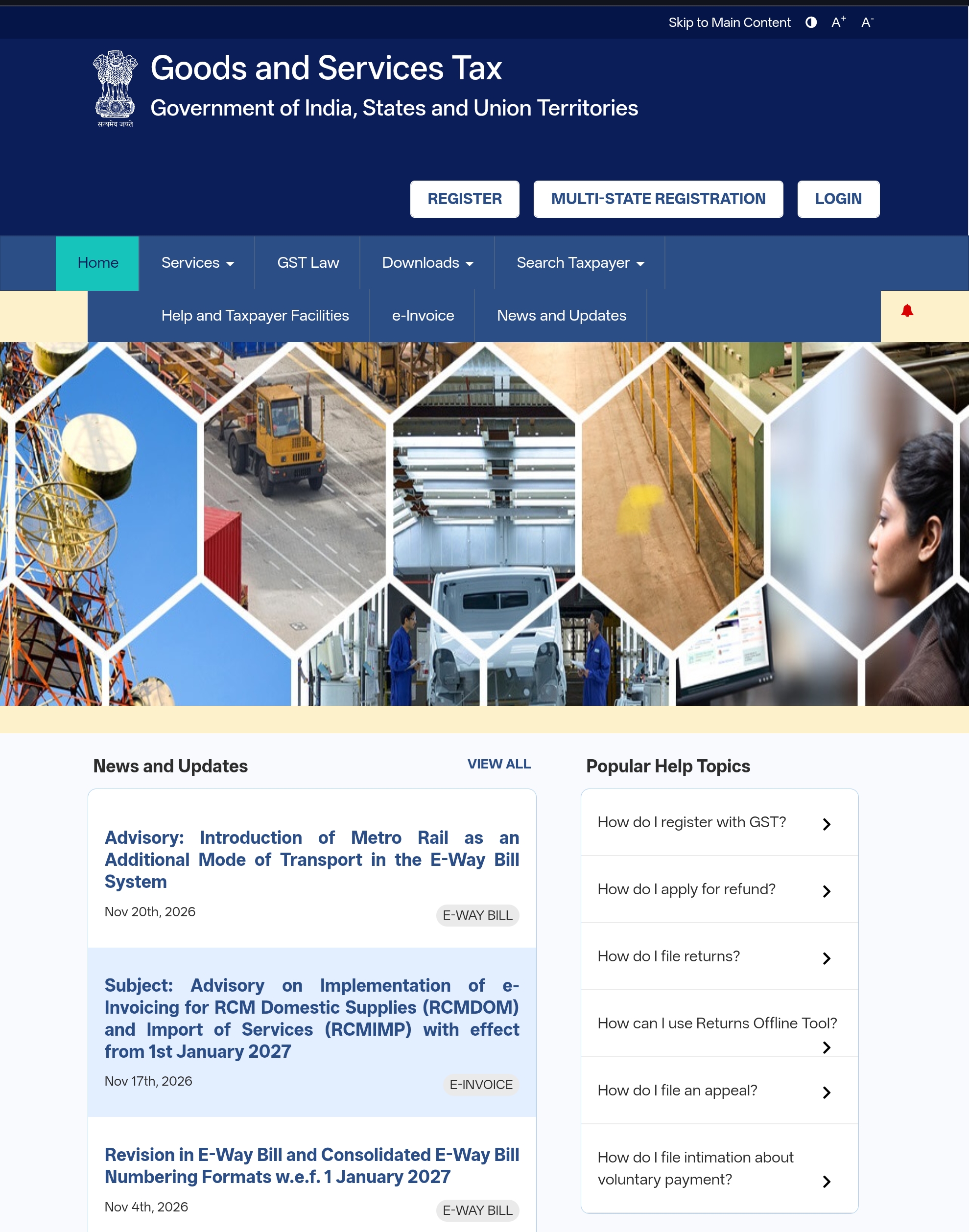
News and Updates
- Advisory: Introduction of Metro Rail as an Additional Mode of Transport in the E-Way Bill SystemNov 20, 2026 · E-Way Bill
- Subject: Advisory on Implementation of e-Invoicing for RCM Domestic Supplies (RCMDOM) and Import of Services (RCMIMP) with effect from 1st January 2027Nov 17, 2026 · e-Invoice
- Revision in E-Way Bill and Consolidated E-Way Bill Numbering Formats w.e.f. 1 January 2027Nov 4, 2026 · E-Way Bill